Git

To quote the man himself, Linus Torvalds, this was git's first commit:
Initial revision of "git", the information manager from hell
General Info
Here's the original readme, pretty informative and a little funny
Working tree: a single checkout that is pulled out of a compressed database in the git directory.
Staging area: a file that stores information about what will go into the next commit (also called index)
Git Directory: The place where git stores the metadata and object database for the project.
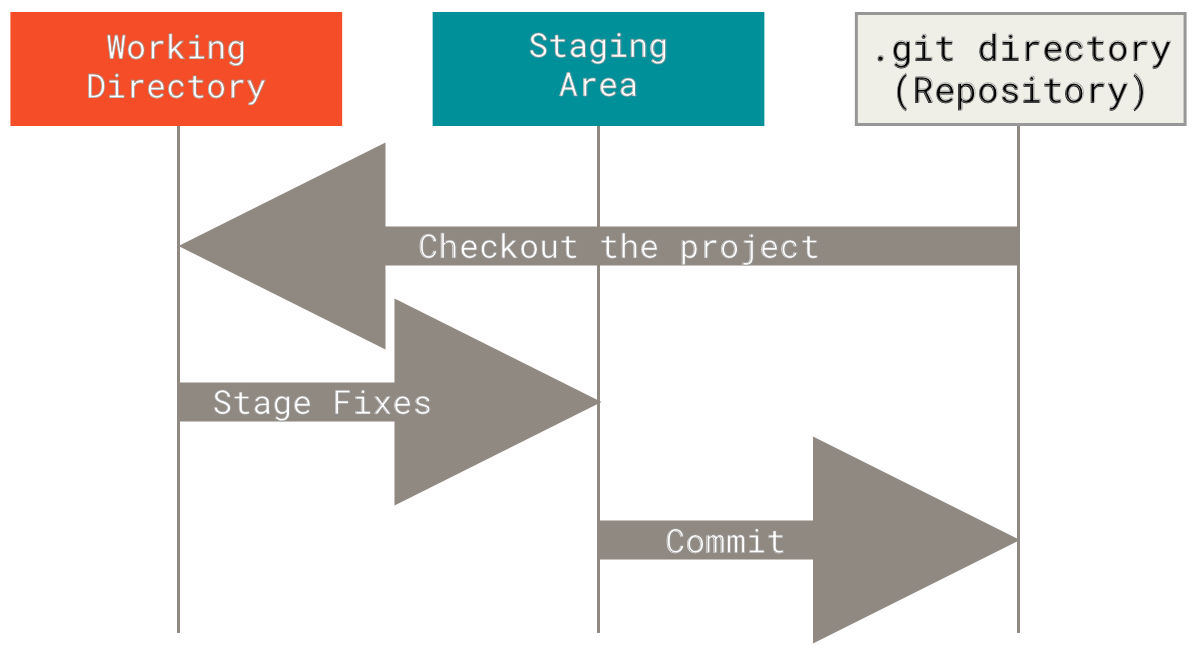
Git has three main types of objects that are stored:
Blobs: which are usually files that are compressed and hashed
Trees: which are structures that point to the files, analogous to directories
Commits: which store information about the hash values, who saved them, when and why they were saved.
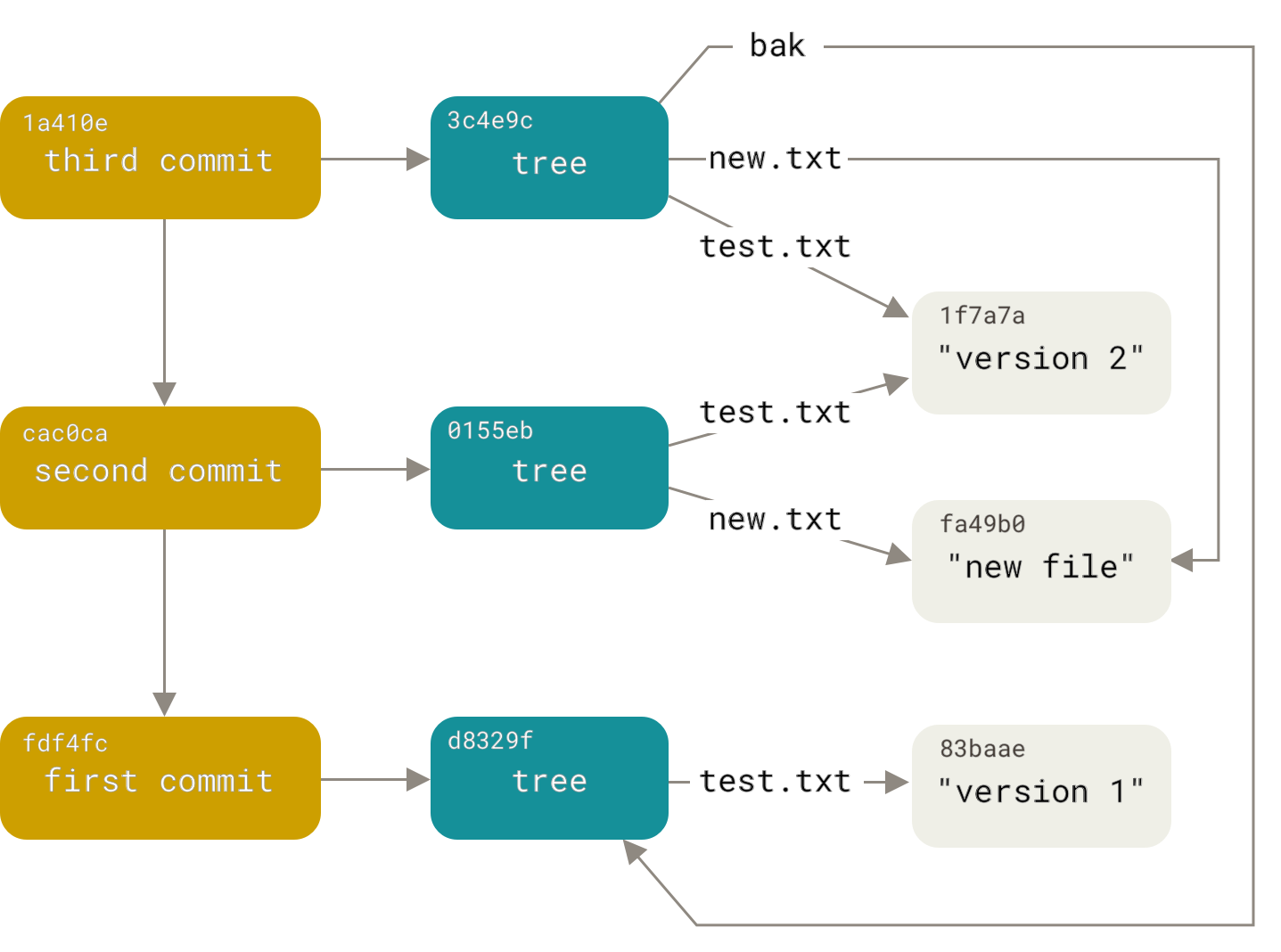
Everything in git is checksummed before it is stored, and then is referred to by that checksum.
Git uses a SHA-1 hash to perform the checksumming --> 40 Character string composed of hex chars. And calculated based on contents of file or directory structure.
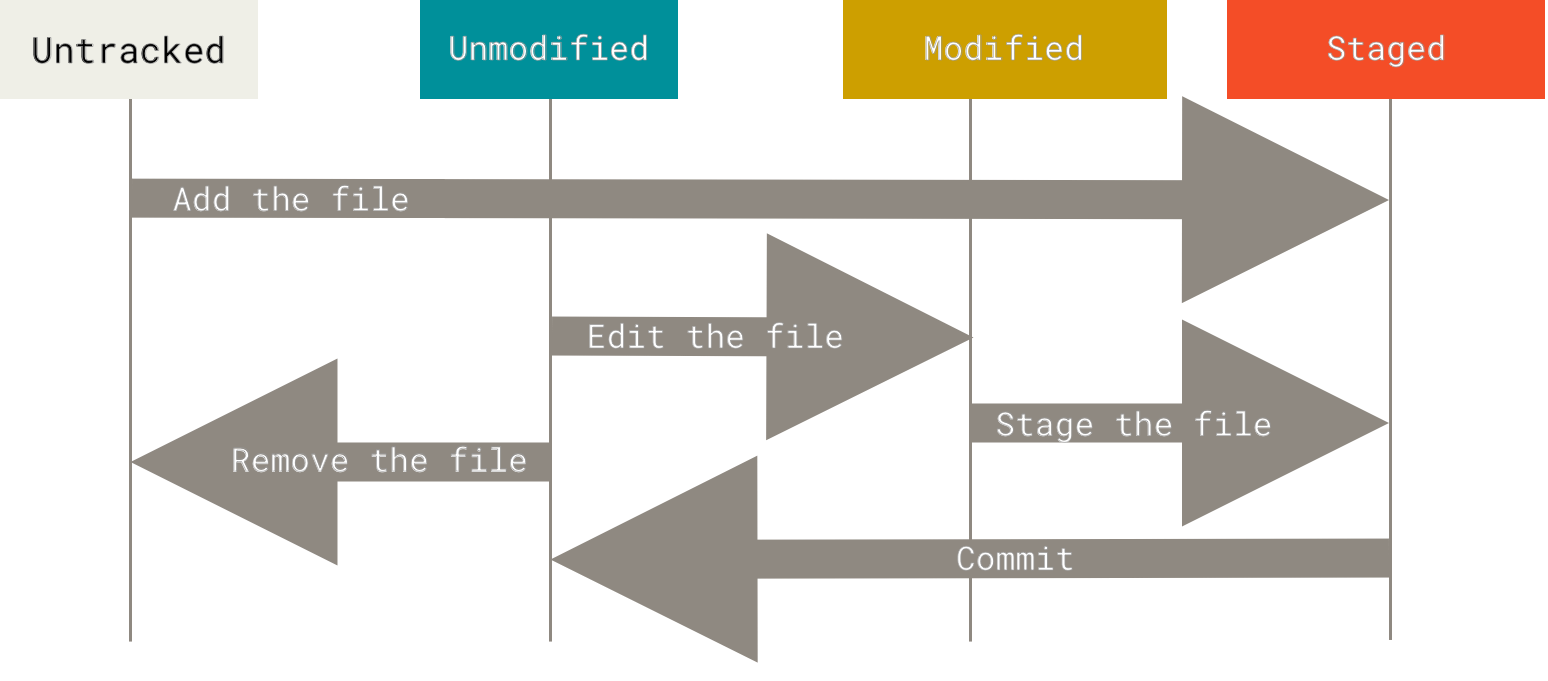
Files have 4 states:
Untracked: files that have been created in the working tree but not yet added to the index/staging area.
Unmodified: files that are in the working tree and have not been edited. This is the vast majority of your files in your working tree.
Modified: files that are in the working tree and edited.
Staged: files that have been copied into the index (.git/index), but have not been committed. This is done by the git add <file> command.
Configuration
git config
git config --list --show-origin
git config --global user.name "John Doe"
git config --global user.email johndoe@example.com
git config --global core.editor vim
git config --global alias.co "checkout"
Basic Commands
Logging
git log --pretty=oneline
git log --stat
git log --since=2.weeks
Diffs and commits
git diff <commit> (HEAD, HEAD^, HEAD~3)
git diff <commit> --staged
git commit --amend
git reset --hard <commit>
git reset --soft <commit>
--amend flag adds changes to the same (previous) commit
git reset --hard resets tree back to the commit and discards the subsequent changes out of local directory.
git reset --soft resets the tree back to the commit but keeps changes in your stage.
get reset --mixed (default to git reset) keeps changes in local directory, but doesn't stage them.

Branching
git branch somebranch (only makes a new branch)
git checkout -b somebranch (makes a branch and switches to it)
git switch -c somebranch (-c means create, updated from git checkout as of Git 2.23)
git branch -vv (shows all branches and their latest commit message, extra v tracking info)
git branch --merged (shows branches that are merged into current branch)
Remote
git remote -v
git remote show <remote> (i.e origin)
git ls-remote origin
git push --set-upstream origin master (or feature branch)
git checkout --track <remote>/<branch> (i.e origin/somebranch)
Rebasing
git checkout someBranch
git rebase master
(then fast forward master)
git checkout master
git merge someBranch
Deleting branches
git branch -d <local branch>
git push origin --delete <remote branch>
git fetch --prune
Pruning branches means deleting remote-tracking branches if they have been deleted upstream. The
technical meaning of pruning is cleaning up unreachable Git objects, meaning inaccessable by any
references. To run this on every pull or fetch you can set config git config remote.origin.prune true
git fetch -p ; git branch -r | awk '{print $1}' | egrep -v -f /dev/fd/0 <(git branch -vv | grep origin) | awk '{print $1}' | xargs git branch -d
This command checks all local branches that are merged to master/main/dev and deletes them if
it is safe to do so.
Misc
Remove already committed files from new .gitignore
git rm -r --cached .
git add .
git commit -m "Dropped files from .gitignore"
cached flag has to do with git tracking, you will still have a copy of the file in your local repo.
Keep Branch Up-to-date
git pull (while on master branch) --> git checkout <branch> --> git merge master
Starting a Repo
git init (makes "initializes" a .git repository)
git remote add origin <github/url>
git push origin master
This creates a remote called origin which is located at a certain github url. when you git push origin master now the master branch locally is pushed to the origin branch which is located at the url you specified, aliased as origin.
Misc
Dealing with remote branches
Display all origin branches.
git branch -r
Or a more verbose command
git remote show origin
check all branches that have been merged into current HEAD
git branch -a --merged
Preview local branches to delete, then delete by pattern.
git branch | grep "<pattern>"
git branch | grep "<pattern>" | xargs git branch -D
Cleaning untracked Files
check what will be deleted first (dry run)
git clean -n -fd
actually delete files and directories from untracked
git clean -fd
Removing files/editing entire history
```bash
git filter-branch --tree-filter 'rm -r
tree-filter runs the command after each checkout of the project and recommits the results
git filter-branch --commit-filter '
  if [ "$GIT_AUTHOR_EMAIL" = "schacon@localhost" ];
  then
    GIT_AUTHOR_NAME="Scott Chacon";
    GIT_AUTHOR_EMAIL="schacon@example.com";
    git commit-tree "$@";
  else
    git commit-tree "$@";
  fi' HEAD
  ```
This command will change the name and email address for every commit.
NOTE:
git-filter-repo is a python script that is the current recommended way of rewriting history. https://github.com/newren/git-filter-repo
Github
I know Github isn't git
'.' brings up web editor
'>' brings up web editor in new window
't' brings up file search
'/' brings up page search